Free template

The student check-in checklist that prevents deposit disputes

Every damage argument at check-out is decided by what was recorded at check-in. If the condition of the room was never captured properly, the residence has no evidence, the student has no reassurance, and the conversation in June becomes a negotiation instead of a fact.

Most residences either skip the check-in record entirely or bury it in a paper form nobody can find nine months later. A good checklist takes about 10 minutes per room and pays for itself hundreds of times over across a building.

1Before the student arrives (staff walk-through)

  • Walls and paintwork photographed, including any existing marks
  • Furniture present and intact per inventory: bed, desk, chair, wardrobe, curtains
  • Appliances tested: fridge, kettle, lamps, AC or heating
  • Kitchen and bathroom fittings checked: sink drains, shower, toilet, hob
  • Keys and fobs counted and recorded
  • Meter readings noted
  • Mattress condition photographed
  • Window and lock operation checked

2With the student (self check-in)

  • Student confirms room condition in their own checklist
  • Student photographs anything already damaged
  • Both parties' records are kept separate and linked to the same room and date
  • Student signs their record
  • Staff countersign

3Paperwork

  • Signed record stored against the room and against the student
  • Photos timestamped so the date cannot be argued later
  • Copy sent to the student automatically
Pro tip

Keep the staff checklist and the student checklist separate. When the two records are independent, nobody can claim the form was filled in for them. This one detail kills most deposit disputes.
Download the template

A clean one-page A4 checklist you can print, fill in and file. Room number, date, student name and signature lines included.

Download the check-in checklist (PDF)

Or stop doing this on paper

Campus Pilot runs this exact flow digitally. Staff complete the pre-arrival checklist on their phone, then the student scans a QR code in the room and confirms their own condition record with photos. Both records are linked to the room and the stay, and neither can be edited after signature.

At check-out, the same evidence is already in place. Damage is priced from the asset register, turned into repair tasks, and invoiced back to the student automatically, without anyone digging through a filing cabinet.

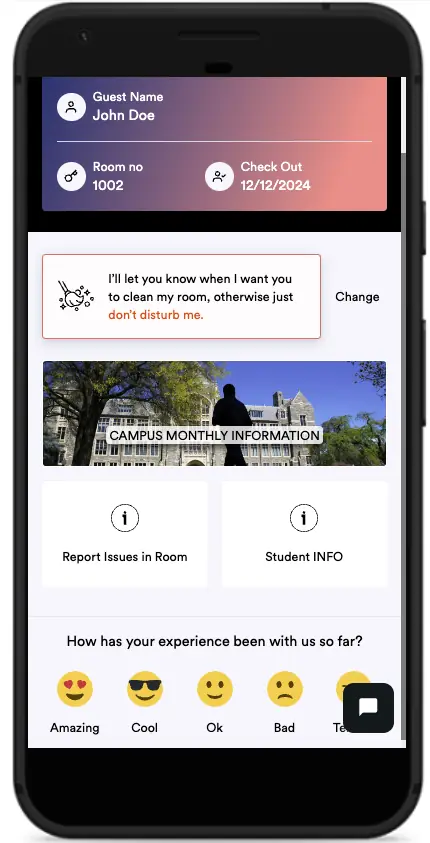
Campus Pilot student app home screen on a phone
Students confirm their own room condition from a QR code, no download required.
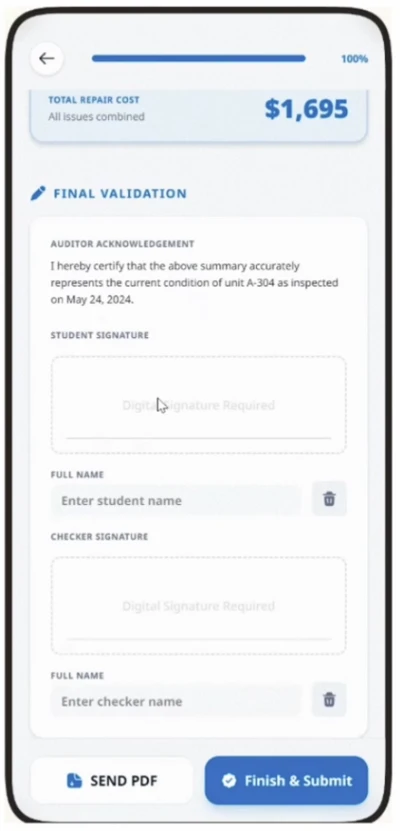
Campus Pilot check-out inspection summary with itemised damage
The signed record and priced items at the end of the stay.
See it on your own rooms →

Frequently asked questions

What should a student check-in checklist include?

It should cover the condition of walls and paintwork, every furniture item on the inventory, appliances, kitchen and bathroom fittings, keys and fobs, meter readings and the mattress. Each item needs a condition note and, where relevant, a timestamped photo. The record should end with a signature from the student and a countersignature from staff.

Should students sign the check-in checklist?

Yes. A signature is what turns a condition record into evidence both sides accepted. The strongest setup is a student signature on their own independent checklist plus a staff countersignature, so neither record can be dismissed as one-sided.

How long should check-in records be kept?

At an absolute minimum until the deposit has been returned and any dispute window has closed. In practice it is safer to keep the full record for the whole tenancy plus the statutory retention period that applies in your country, since disputes and audits can surface long after the student has moved out.

Can check-in checklists be digital?

Digital is generally better than paper, because photos carry timestamps, records cannot be quietly edited, and nothing gets lost between September and June. Campus Pilot runs the staff walk-through and the student self check-in digitally and links both records to the same room and stay.

Keep reading

See it fly.

Bring your team to a live walkthrough. See exactly how Campus Pilot would run for your buildings, reservations and checklists, no paperwork required.

Book a demo →