Free template

The student check-out checklist that recovers damage costs

Check-out is where residences quietly lose money. The kettle that vanished, the scuffed wall, the stained mattress. Individually they look too small to chase. Across a few hundred beds they add up to a serious annual write-off.

Without a checklist compared against check-in evidence, none of it gets charged, because nobody can prove when the damage happened. Operators running a proper check-out flow recover on the order of €500 per student per year.

1Before inspection

  • Pull the check-in record and photos for the room
  • Book the inspection slot with the student so they can attend
  • Bring the room inventory and the current price list

2Room inspection

  • Compare every wall, furniture item and appliance against the check-in photos
  • Photograph all new damage from the same angles as check-in
  • Check inventory completeness: kettle, hangers, bins, remote controls
  • Test appliances: fridge, lamps, AC or heating, hob
  • Note the cleaning standard the room was left in
  • Record meter readings
  • Collect all keys and fobs

3Costing and sign-off

  • Price each damage item from the asset list, with markup where policy allows
  • Student sees the itemised list before anything is charged
  • Both parties sign the inspection record
  • PDF copy sent to the student
  • Deductions applied to the deposit
Pro tip

Price the assets before the semester starts, not during the inspection. When the coat hanger already has a price on file, check-out costing is arithmetic, not an argument.
Download the template

A clean one-page A4 checklist you can print, fill in and file. Room number, date, student name and signature lines included.

Download the check-out checklist (PDF)

Or let the software do the comparing

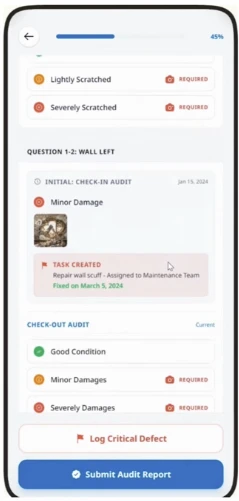
Campus Pilot pulls up the check-in photos next to the inspector's camera, so the comparison happens on screen instead of from memory. Anything new is photographed and logged against the room in seconds.

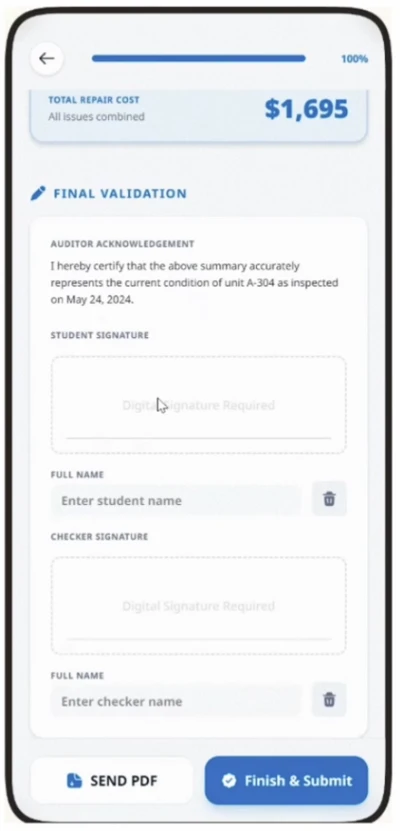
From there the platform creates the repair tasks automatically, prices the damage from the asset register and produces the signed PDF on the spot, ready to apply against the deposit.

Campus Pilot check-out inspection screen showing damage logged against a room
New damage captured against the check-in record, item by item.
Campus Pilot check-out inspection summary with itemised damage costs
The itemised, priced summary both parties sign before the deposit is settled.
See it on your own rooms →

Frequently asked questions

What can be deducted from a student's deposit?

Fair wear and tear cannot be deducted, but evidenced damage, missing inventory items and cleaning beyond the agreed standard usually can. The exact rules vary by country and by tenancy agreement, so check local deposit legislation. In every jurisdiction, signed evidence from both check-in and check-out is what makes a deduction stand up.

What should a check-out inspection include?

A walk-through of every wall, furniture item and appliance compared against the check-in photos, photographs of all new damage, an inventory count, appliance tests, a cleaning assessment, meter readings and the return of all keys and fobs. It should finish with an itemised cost list that the student sees and signs.

How do you prove damage happened during the tenancy?

By comparing timestamped check-in photos with timestamped check-out photos of the same item. If the check-in record shows an intact wardrobe door and the check-out record shows a broken one, the timeline is not open to interpretation. That comparison is the whole reason the check-in record matters.

Can students dispute check-out charges?

Yes, and they regularly do, which is exactly why dual signatures and photo evidence matter. When the student signed their own condition record at check-in and signed the itemised list at check-out, most disputes end before they start.

Keep reading

See it fly.

Bring your team to a live walkthrough. See exactly how Campus Pilot would run for your buildings, reservations and checklists, no paperwork required.

Book a demo →